


myORCA
3.0210.00 Reviews
App Specs
- Version
- 1.7.4
- Updated On
- License
- Free
- Downloads
- 100,000+
- Developer
- myORCA
- Categories
- Travel & Local
- Platform
- Android
Screenshots
 Analysis by AppCompare
Managing a transit card is usually the sort of task I want to finish before I leave home, not something that should require a desktop browser or a trip to a service counter. That is the basic appeal of myORCA, a free Travel & Local app from myORCA that puts ORCA card management on a phone. I approached it as a practical utility rather than an entertainment app, and that distinction matters: its value comes from making routine travel administration easier, not from offering a broad journey-planning experience.
In everyday use, the app makes the most sense for someone who already relies on an ORCA card and wants a more convenient way to keep an eye on it while moving around. It is available for everyone, works on Android devices running Android 5.0 or later, and has reached over one hundred thousand installs. That gives it a meaningful audience, although the average score of three out of five from nearly four hundred ratings suggests that the experience is useful but not consistently smooth for every rider.
How myORCA fits into a normal travel routine
The strongest reason to install myORCA is convenience between journeys. Instead of treating the card as something that only matters when tapping onto a bus, train, or other participating service, the app gives it a place in your regular phone routine. I can imagine checking the account before leaving for work, reviewing it after a busy day of transfers, or handling a small administrative task while waiting for a vehicle.
That sounds modest, but transit tools are often judged by how much uncertainty they remove. A rider does not necessarily need a feature-packed travel suite. Sometimes the useful question is simply whether the card is ready for the next trip and whether account management can be handled without interrupting the day. For that narrow purpose, a dedicated ORCA companion is more direct than opening a general browser and searching for the correct account page.
The app is best understood as a management tool, not as a replacement for every other transit resource. If I needed detailed route discovery, service alerts, walking directions, or a map-based comparison of different ways to reach a destination, I would still use a separate transit or mapping app. myORCA’s role is more focused: it belongs alongside those tools, helping with the card itself while another app handles navigation.
A realistic example before and after commuting
Consider a rider who has an early appointment across town. The night before, checking the ORCA account through the phone is more convenient than remembering to deal with it at a station. In the morning, the rider can keep the travel-planning app open for directions while using myORCA for the card-related part of the preparation. If something needs attention, that discovery happens before the person is standing in a boarding line.
After the trip, the same habit can help with personal record-keeping. A commuter who travels several days a week may want to glance at the account after a particularly busy day, especially when several rides or transfers have made the balance less intuitive. The app does not need to become a daily ritual for everyone; even occasional checks can be worthwhile when they prevent a last-minute scramble.
Worth Reading Before You Choose

EA SPORTS FC Mobile 26 Is a Bigger Football Game, but It Takes Time

Flipboard Shows What News Apps Must Do Beyond the Feed

Switching to Android Auto Means Rethinking Your Driving Routine

Google Calendar Makes a Crowded Week Easier to Manage

Ludo King Makes the Most of the Minutes Between Plans

Baby Panda World Brings Quick Play to Modern Phones, but Its Game Library Feels Busy
There is also a useful distinction between managing a card and physically carrying one. A phone app can make account tasks more accessible, but it does not automatically change how a rider taps or what card they present during travel. I would therefore treat the app as a companion to the ORCA card rather than assuming that installing it removes the need for the card itself. That is an important expectation to set before relying on it for a trip.
What the free price means in practice
The app is free, so there is no purchase decision to weigh against a subscription or an upfront charge. That makes experimentation easy: an ORCA user can try it without paying to discover whether its account-management workflow suits them. The value question is therefore about time, reliability, and convenience rather than recovering a financial investment.
Free access does not automatically make every experience worthwhile. A tool that saves a few minutes can still feel frustrating if signing in, refreshing information, or finding the right account screen is unreliable. The three-star average is a useful warning to keep expectations measured. I would install it because there is no price barrier, but I would test it before making it the only way I manage my transit account.
This is also where the app differs from paid travel utilities. There is no need to justify a recurring expense, and the decision is not about whether premium planning features are worth buying. Instead, myORCA earns its place if it makes ORCA administration simpler than the alternatives already on your phone. If it does not, uninstalling it costs nothing and leaves other management methods available.
Where the app delivers practical value
The first benefit is focus. A general web search can lead to unrelated results, while a dedicated app puts the transit-card task in a recognizable location. For people who manage several travel details at once, that narrower purpose can reduce the number of steps between deciding to check an account and actually checking it.
The second benefit is mobility. A phone-based tool is available in the situations where a desktop computer is not: on a platform, in a parking area before driving to a station, or during a break at work. I would not use it while walking or boarding, but having the option ready in advance is still valuable. Transit problems often become expensive in time when they are discovered at the last possible moment.
The third benefit is habit formation. Keeping a card-management app near other travel tools can encourage a simple pre-trip routine: check the route elsewhere, confirm the ORCA account here, then leave. That workflow is more useful than repeatedly opening the app without a specific reason. In my view, the app’s best feature is not any single screen; it is the way a dedicated place for card administration can make preparation more consistent.
There is a less obvious advantage for households that share responsibility for travel planning. One person may organize routes while another keeps track of the card. A focused management app can make that division clearer than a browser bookmark buried among unrelated pages. I would still be careful about account privacy and would not leave a shared phone signed in without considering who can view or change the account.
Small workflow choices that make it more useful
I would install and open the app well before an important journey rather than during a rush. That first session is the right time to learn where the relevant account information appears and to discover whether the sign-in process works smoothly on the device. Testing early turns a potentially stressful travel moment into a routine check.
I would also avoid treating the displayed information as a substitute for common sense. If the account view looks outdated or does not match what I expect after a recent action, I would give it time and use another official management route before boarding. This is not a criticism unique to myORCA; account tools depend on information being available and current. The practical lesson is to verify anything important before the trip, not at the gate.
Another useful habit is separating card management from journey planning. I would use myORCA for the ORCA-specific task and keep a mapping or transit app for departure times and directions. Trying to force one focused utility to answer every travel question usually creates more friction, not less. This two-app approach may sound less elegant, but it respects what each tool is designed to do.
The trade-offs behind a focused transit app
The narrow scope is both the app’s strength and its main limitation. If I only need to manage an ORCA card, a dedicated tool is easier to understand than a large travel platform. If I want route planning, live disruption information, or broad regional travel research in the same place, I will need additional apps or services.
The average rating also tells me not to assume that every rider will have the same experience. A three-out-of-five score from nearly four hundred ratings is neither a reason to reject the app automatically nor evidence that it will be flawless. It suggests a mixed experience, so I would pay attention to how reliably it opens, authenticates, and reflects account information on my own phone rather than relying only on other people’s impressions.
Version 1.7.4 shows that the app has an identifiable current release to install, while its original release was in May 2022. For a utility, continued versioning is relevant because users want a tool that remains usable as phone software changes. At the same time, a version number alone does not guarantee that every device or account workflow will feel equally polished. I would keep the app updated through the normal app-store process and still maintain a backup way to manage the card.
Compatibility is relatively broad on Android because the minimum requirement is Android 5.0. That helps people using older devices avoid an immediate operating-system barrier. However, broad compatibility should not be confused with universal performance. Screen size, device age, connectivity, and account setup can all affect how comfortable a phone-based account tool feels in practice.
Who will get the most value from it
myORCA is a good fit for regular ORCA users who prefer handling practical tasks from a phone. It is especially sensible for commuters, students, occasional travelers who dislike paper-based administration, and anyone who wants a dedicated place for card-related checks. Because the app is free, these users can evaluate it based on convenience rather than worrying about wasting money.
It can also suit people who already use a separate app for routes and want to fill the account-management gap. In that setup, myORCA does not need to replace anything. It simply handles the part that a map app is not designed to handle. That division of labor is, in my opinion, the most realistic way to use it.
I would be more cautious if you rarely use an ORCA card or only travel once in a long while. For an infrequent rider, opening a browser or using an existing official channel may be enough, and adding another app may not improve the routine. The same applies to someone looking for a complete travel planner: this is not the app I would choose as the sole tool for discovering routes and managing an entire itinerary.
People who dislike troubleshooting should also test it during a low-pressure moment. The free price makes that easy, but the middling rating means I would not depend on it blindly for a time-sensitive journey until I had confirmed that it behaves properly on my device and with my account.
My final recommendation for Android users
I recommend trying myORCA if you use an ORCA card often and want a mobile-first way to manage it. Its free cost removes the biggest barrier, its purpose is clear, and its focused design can fit neatly into a pre-trip routine. The app delivers the most value when it saves you from searching for the right account page or postponing a simple card check until you are already traveling.
My recommendation is deliberately practical rather than enthusiastic. The three-star average means I would keep an alternative management method available, especially before an important trip. I would install it, complete the setup early, test the account workflow, and then decide whether it is dependable enough for regular use. If it works smoothly for you, the convenience is easy to appreciate; if it introduces more friction than it removes, there is no purchase to regret.
My verdict: try it for ORCA management, but do not mistake it for a complete transit-planning app. For the right rider, myORCA is a useful free companion that puts a specific travel task within reach. For someone seeking maps, schedules, and broad journey planning in one package, a different category of app will be a better choice. Its value comes from that focused role, and the best decision is to judge it against your own commuting routine rather than expecting it to solve every travel problem.
Pros
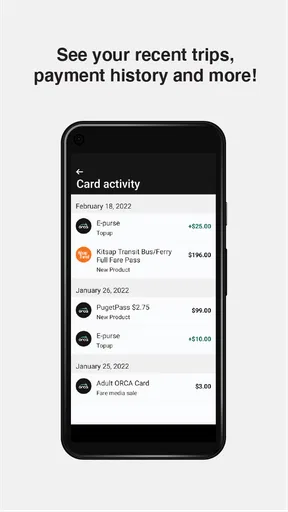
- Check balances and recent transactions without visiting a ticket machine.
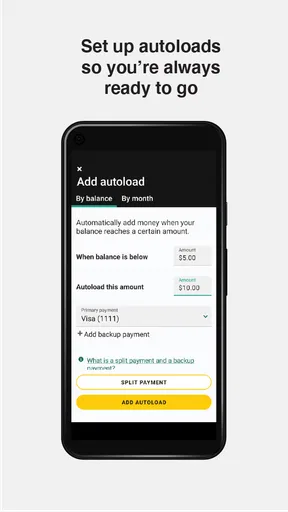
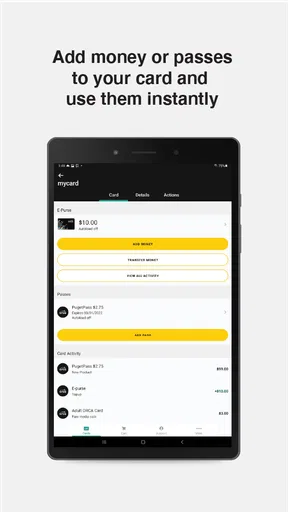
- Reload your ORCA card remotely using a linked payment method.
- Supports mobile ticket purchases for convenient public transport access.
- Useful trip-planning tools help compare routes and departure times.
- Service alerts can help you avoid disruptions on participating transit networks.
Cons
- Some features depend on the transit agencies and region where you use ORCA.
- Reloads may not appear immediately on the physical card or reader.
- A compatible NFC-enabled phone may be required for certain card functions.
- Account or payment issues can make last-minute ticket purchases inconvenient.
- The interface may feel less useful outside the Seattle-area transit system.
FAQs for myORCA
What is myORCA and what can I use it for?
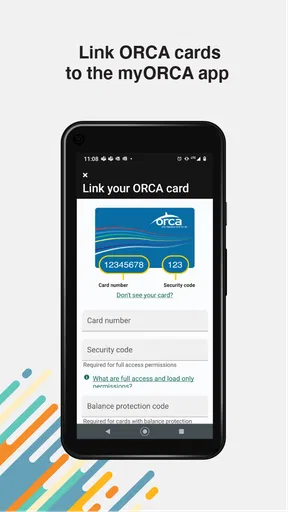
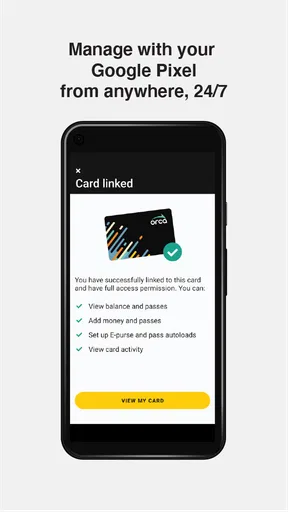
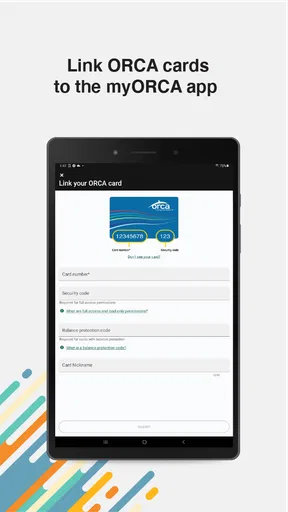
myORCA is the official mobile app for managing ORCA transit payments in the Puget Sound region. After installing it, you can check your card balance, review recent transactions, add value or passes, and manage multiple ORCA cards from one place. It is designed for riders using participating buses, trains, ferries, and other regional transportation services.
Can I add money to my ORCA card through the myORCA app?
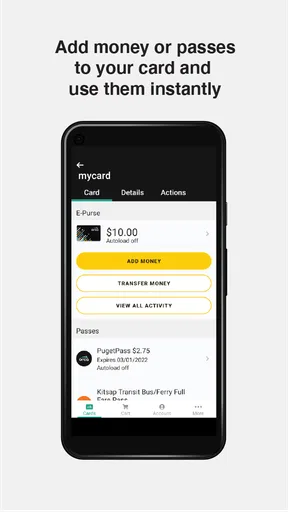
Yes, the app allows you to add funds to an eligible ORCA card using a supported payment method, such as a debit or credit card. Before relying on the balance for an immediate trip, keep in mind that processing and card-update times may vary. It is a good idea to confirm that the value has been successfully loaded before boarding.
Does myORCA support mobile payments or digital ORCA cards?
myORCA can support mobile ORCA functionality on compatible devices and accounts, allowing eligible riders to use a phone instead of carrying a physical card. Availability may depend on your device, operating system, account setup, and the local ORCA system. Check the app’s current requirements before assuming your phone can replace your plastic card.
Can I manage more than one ORCA card in myORCA?
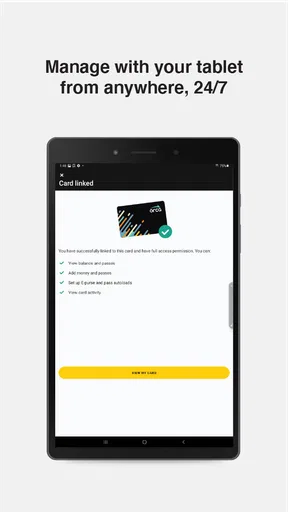
The app is useful for households and riders who need to keep track of multiple ORCA cards. Depending on the account configuration, you can view cards, monitor balances, and manage reloads without visiting a ticket machine for every change. Take care when selecting a card before adding value, especially if several cards have similar names or details.
Is myORCA free to download, and is it safe to use?
myORCA is generally free to download, although normal mobile data charges may apply and transit purchases still cost the applicable fare. The app handles payment and travel-card information, so download it only from the official Google Play Store or Apple App Store. Use a strong account password, keep your device updated, and avoid entering payment details on unofficial websites or modified app versions.


